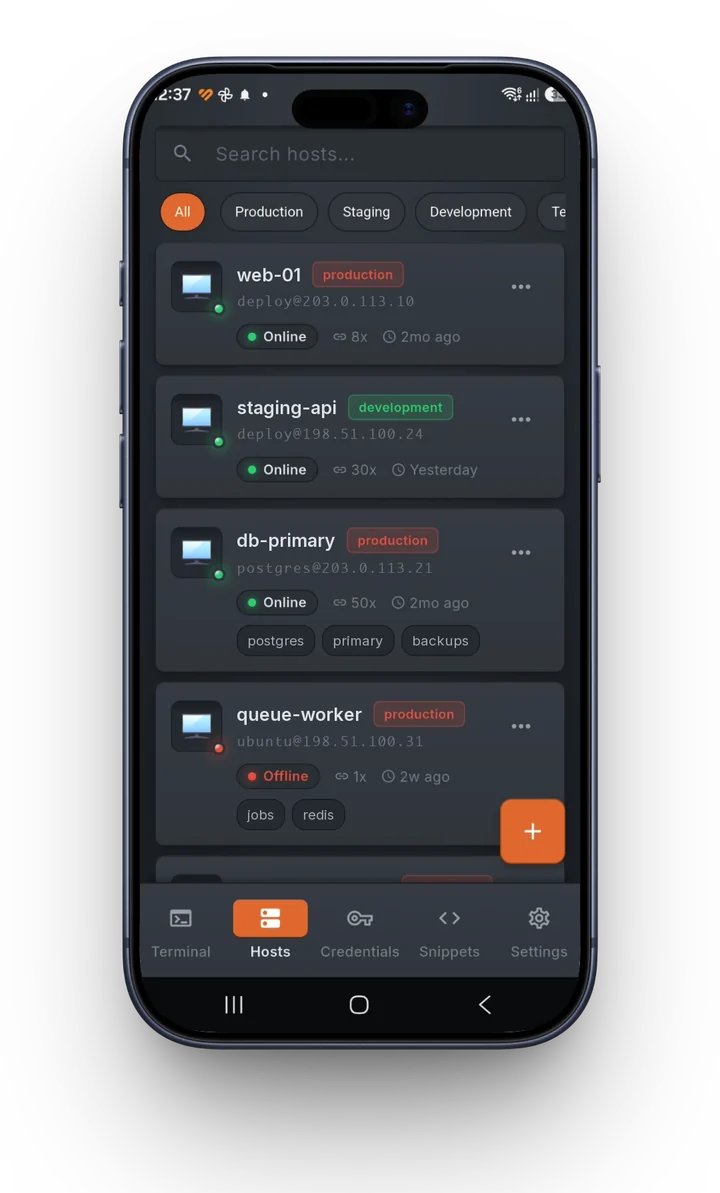
An SSH client that keeps everything on your devices.

Terminal, SFTP, port forwarding and live server monitoring. Every host, password and key sits in an encrypted vault on your own machines: no account, no cloud, nothing to sign up for.

Free for macOS, Windows, Linux and Android.


One window for the whole job

Connecting is the easy part. Gosshed also moves the files, opens the tunnels and watches the server while you work.

SFTP, side by side

Your disk on the left, the server on the right. Drag across, edit a remote file in place, or switch to root when a path needs it.

Watch the server while you work

CPU, memory, disk and network for a Linux host, read over the SSH session you already have open. Nothing to install on the server.

Port forwarding

Local, remote and SOCKS tunnels per session, started and stopped from a list instead of a flag you have to remember.

Jump hosts, chained

Reach a private server through one bastion or several. Each hop has its own credential and its own host key check.

Snippets with blanks

Save the commands you keep retyping. Placeholders ask for their value when you run one on a session.

Record a session, replay it later

Recordings are plain asciicast files. Play one back at half speed to see what happened, or at 4x to find the moment it went wrong.

What it looks like

Straight from the macOS app. Windows, Linux and the phone apps share the same look.
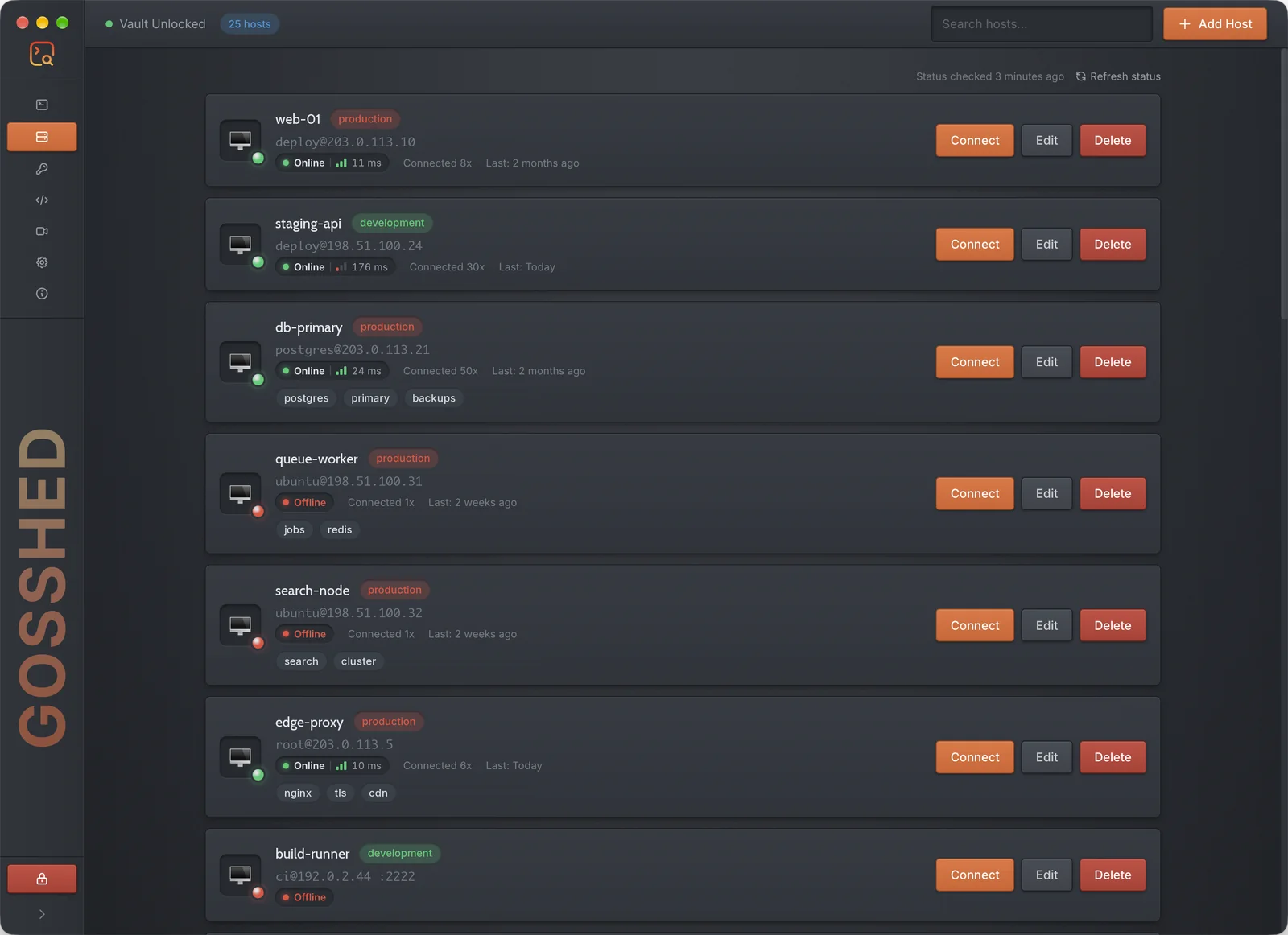
The host list: each host with its environment, address, status, latency and tags.
Every host with its environment, live status and latency, one click from a session.

Move your vault to another device without a server in between

The two devices talk directly over your own network. A one-time pairing code protects the transfer, and the vault arrives re-encrypted under that device's master password.

  1. Share on the device that has the vault. It shows a QR code and a pairing code.
  2. Scan the QR code with Gosshed on your phone, or type the code on a computer.
  3. Done. Hosts, credentials and snippets are merged in. Nothing was uploaded anywhere.

What protects your keys

A password manager for servers is only worth using if you can say exactly how it guards what it holds. Here is the list.

Vault encryption
AES-256-GCM, with the key derived from your master password by Argon2id.
Where it lives
One file on your device. There is no Gosshed account and no Gosshed server to breach.
Backups
Exported with XChaCha20-Poly1305 under a password of their own, so a backup is safe to keep anywhere.
Host keys
Checked on every connection, including each jump host, so a swapped server is caught before you type a password.
Two-factor servers
Keyboard-interactive prompts and time-based codes are supported, alone or after a key.
Auto-lock
The vault locks itself after the idle time you choose, and open sessions end with it.
Purge
Destroying a vault overwrites the file first: three passes (DoD 5220.22-M) or thirty-five (Gutmann).
Status checks
Off until you turn them on, and rationed, because every probe is a connection your server's fail2ban may count.

Download Gosshed

Free to use, on every device you work from. The current version is 2.3.0, released October 8, 2026. See what changed.

Mirror

    Changelog

    Every release so far, newest first. Open a version to see what changed.

    v2.3.0Desktop & Mobile
    • UI A new look: the Velvet Lite theme on desktop and mobile.
    • Vault Sync your vault by QR code: the sending device shows one, and the phone scans it instead of typing the address and pairing code.
    • Vault Vault purge now overwrites the vault before deleting it, with DoD 5220.22-M (3 passes) or Gutmann (35 passes) and a progress display.
    • Vault Import Vault shows the backup's details and asks for its password in one dialog.
    • Vault Locking or purging the vault now ends every open SSH session.
    • Vault Vault sync needs v2.3.0 on both devices: update the desktop and the phone before syncing.
    • SSH Two-factor logins: servers that ask for a one-time code, alone or after a key or password. A TOTP secret saved on a credential answers it for you.
    • SSH A dead network no longer freezes the app: the connection closes within a minute and the reconnect dialog appears.
    • SFTP Transfers resume where they stopped, files copy between two servers, folders sync between this computer and a server, and transfers can be verified with SHA-256.
    • SFTP A built-in editor for remote files, with syntax highlighting and safe saves.
    • Terminal Find in the terminal: Cmd+F on macOS, Ctrl+Shift+F on Windows and Linux, and a Find bar on mobile.
    • Terminal A toolbar with Copy, Paste, Select all, Find and Clear scrollback as icon buttons, and tooltips across the session toolbar.
    • Hosts Host status in the host list, on desktop and mobile. It is off until you turn it on, and rationed so a server's fail2ban does not count the checks as an attack.
    • UI The window reopens where you left it, at the same size.
    • Security Hardening from a full code review: stricter host key checks on jump hosts, safer vault writes, and a sync that confirms the right device received the vault.
    • Mobile Monitor charts no longer reset when the app is covered or left for a moment.
    • Mobile Menu names match the desktop: SFTP, Ports and Credentials.
    • SFTP Fixed deleting a remote folder that contains symlinks, which could fail or delete what a link pointed to.
    • Hosts Fixed the connection count and last connect in the host list only updating after a restart.
    • Vault Fixed a vault export blocked by macOS or an antivirus not saying what blocked it.
    • Updater Update checks and downloads have moved to gosshed.com.
    v2.2.0Desktop & Mobile
    • Monitor Added a Monitor tab with live CPU (total and per core), memory, disks, network, disk I/O, temperature and top processes, read over the session's own SSH connection. Nothing is installed on the server, and it works through jump hosts. Turn it on per host, with a refresh interval of your choice. Linux servers.
    • Monitor A "Restart required" indicator now appears when the server has updates waiting for a reboot, with the reason one hover or tap away.
    • SFTP Uploads on the Desktop are much faster: they had been sending one packet per round trip, and are now pipelined again.
    • SFTP Folders now transfer several files at once, each over its own SSH channel.
    • SFTP Large files are split across several SSH channels to make the most of high-latency connections, with larger packets on servers that support them.
    • Terminal Added Duplicate Session to the terminal tab menu, to open another session to the same host in one click.
    • Terminal Each session now remembers its own view: Terminal, SFTP, Ports or Monitor.
    • UI On/off settings now use toggles instead of checkboxes.
    • UI Added an animated network backdrop to the vault setup and unlock screens.
    • UI The collapsed sidebar now shows a vertical Gosshed wordmark.
    • Mobile Added the Monitor screen, with the same live metrics as the Desktop.
    • Mobile Uploads are up to 18x faster, folder upload now includes subfolders, and transfers can be cancelled.
    • Mobile Tap a host to connect. Edit and Delete have moved to the options menu, and swiping still edits and deletes.
    • Mobile The terminal toolbar now scrolls sideways on narrow phones instead of cutting off its last buttons.
    • Mobile Android: this release is signed with a new key, so it cannot update v2.1.0 in place. Export or sync your vault first, then uninstall v2.1.0 and install v2.2.0.
    • Vault Fixed a vault received from another device, or imported from a backup, only showing up after locking and unlocking.
    • Monitor Fixed turning monitoring on from the Monitor tab being undone when the host dialog was saved afterwards.
    • Mobile Fixed host names disappearing from the host list on narrow phones.
    • Mobile Fixed swipe-to-delete asking for confirmation twice, and leaving the list broken if the second prompt was cancelled.
    • UI Fixed the macOS window buttons running into the edge of the collapsed sidebar.
    • Build Fixed frontend type checking, which had silently not been running at all.
    v2.1.0Desktop & Mobile
    • Vault Sync your vault straight to another device over the local network: no server and no account. A pairing code protects the transfer, and the vault is merged rather than replaced, with credentials re-encrypted under the receiving device's own master password.
    • Vault Added auto-lock: the vault now locks itself after a configurable period of inactivity, with a new settings panel to control it.
    • SSH Added import of hosts from an existing ~/.ssh/config, with a preview of what would be created before anything is written.
    • SSH Added import of trusted host keys from known_hosts, so hosts you already approved in a terminal do not have to be approved again.
    • SSH Added agent forwarding, configurable per host. Your key never leaves the device: only signatures are sent.
    • SSH Added multi-hop jump chains, so a jump host can now sit behind another.
    • Terminal Added a guardrail for production hosts: a destructive command aimed at one asks for confirmation before it runs.
    • Recording Secrets are now stripped from session recordings as they are written, so a .cast file can be shared without leaking a private key or token that happened to scroll past.
    • SFTP Added root access for browsing directories your login user cannot read, on both Desktop and Mobile.
    • SFTP File and permission errors now appear in a proper dialog with the option to retry as root, instead of leaving a blank panel behind.
    • UI The sidebar can now be collapsed and expanded.
    • UI Refreshed the Gosshed icon and logo across every platform and throughout the app.
    • Mobile Reached full feature parity with the Desktop: vault sync, auto-lock, SSH imports, production guardrails, recording redaction, agent forwarding and jump chains are all available on the phone.
    • Mobile SSH sessions now stay alive while the app is in the background.
    • Mobile Added root browsing over SFTP.
    • Mobile Fixed jump hosts never actually being tunnelled through, which meant hosts reachable only from a bastion could not connect at all.
    • Mobile Fixed a terminal tab opening for every jump host in a chain.
    • Mobile Fixed rotating the device wiping the terminal and leaving it unable to accept input.
    • Mobile Fixed vault exports writing credentials the importing device could never decrypt.
    • Mobile The app now reports its real version instead of a number that had drifted out of date.
    • SSH Fixed per-host port forwarding rules being configured but never actually started.
    • SSH Fixed jump host keys not being verified.
    • SSH Fixed a race on the connection state, and a lock held for the whole of dialling that could stall the interface.
    • SFTP Fixed the file panel becoming unusable after opening a directory it could not read.
    • UI Fixed backend error messages being discarded, which left dialogs that explained nothing.
    • UI Fixed the Edit Host dialog reopening on whichever step it was last left on instead of the first.
    • UI Fixed host, credential, snippet and folder lists reshuffling their order on every open.
    • Vault Fixed auto-lock being able to fire while you were still working.
    • Recording Fixed the redaction marker itself being redacted a second time.
    • Updater Fixed Check for Update failing outright on development builds.
    • Build Fixed go build ./... failing on a fresh clone.
    v2.0.0Mobile: v1.0.0
    • Massive UI overhaul delivering a stunning, unified experience across both Desktop and Mobile, perfectly aligned with the new ui-kit standards.
    • Unleashed robust port forwarding and state-of-the-art session management on the brand-new Flutter mobile client.
    • Integrated a highly secure, real-time traffic monitoring subsystem directly into the backend SSH services.
    • Re-engineered the SFTP cross-panel layout for seamless file transfers alongside vastly improved Terminal Quick Keys functionality.
    • Hunted down and eradicated numerous horizontal UI clipping anomalies and flex overflow bugs, ensuring a flawlessly smooth visual layout.
    v1.5.1
    • Fixed Makefile build for macOS.
    v1.5.0
    • Updated the app icon with a new design.
    • SFTP Added multi select support for files and folders for upload and download.
    • SFTP Added drag and drop support for multi select file and folder upload and download.
    • SFTP Added a resizable separator between the local and remote panels.
    • Main Window Fixed an issue where the main window could scroll horizontally when too many terminal session tabs exceeded the window width.
    • Terminal Added a horizontal scrollbar to the terminal session tab area when tabs overflow the main window width.
    • Terminal Added left and right navigation buttons to the terminal session tab area to scroll through tabs when they overflow the main window width. The navigation buttons only appear when needed.
    • Terminal Fixed an issue where the Active Session counter incorrectly counted terminal tabs instead of actual active sessions.
    • Terminal Added a context menu to the terminal.
    • Terminal Added a context menu to terminal session tabs.
    v1.0.1
    • Official public release of Gosshed, marking the transition from beta to stable.
    • Improved SSH banner handling to ensure consistent display behavior.
    • Secure encrypted vault export and import is now available.
    • Added built-in update checker to fetch the latest version from the server.
    • New Settings section added to the sidebar for better configuration management.
    • Purge Vault action has been relocated to Settings for safer access and cleaner navigation.
    v0.1.1-beta
    • Improved host key pinning behavior and clearer error messages.
    • Enhanced SSH handshake stability and connection reliability.
    • Fixed issues with UTF-8 rendering in terminal output.
    • Improved the SFTP transfer panel for better usability.
    • Fixed the upload progress bar to update in real time.
    • Fixed the download progress bar to update in real time.
    • Performance improvements and minor bug fixes.
    v0.1.0-beta
    • First public beta release.
    • Vault upgraded to version 2.0.0 with improved encryption and security.
    • Added strict host key checking.
    • Added host key pinning for enhanced SSH security.
    • Improved UTF-8 support for extended ASCII characters.
    • Introduced snippet library for reusable SSH commands.
    v0.0.5-alpha
    • First alpha release.
    • Initial MVP features: SSH Client, SFTP, Port Forwarding, and Snippet Library.